

Built for Linux. In active development.
Find your cut.
Make it yours.
A native video editor with a magnetic timeline, scene-linear colour, and local AI tools. From the first assembly to the final frame.
Start with Klipp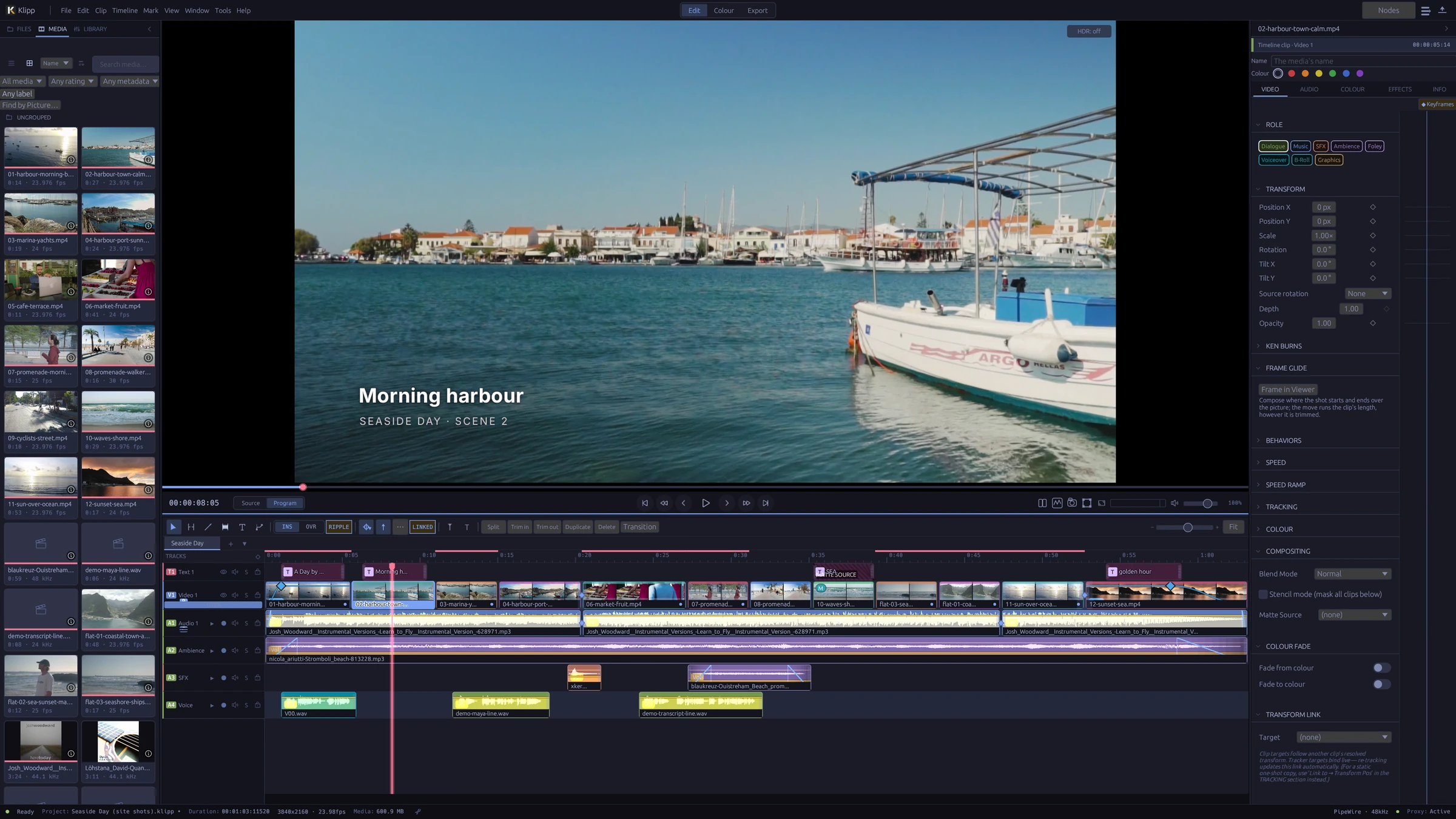
01 / The edit
Room for the whole story.
Shape the rhythm. Keep picture, sound, and words together.
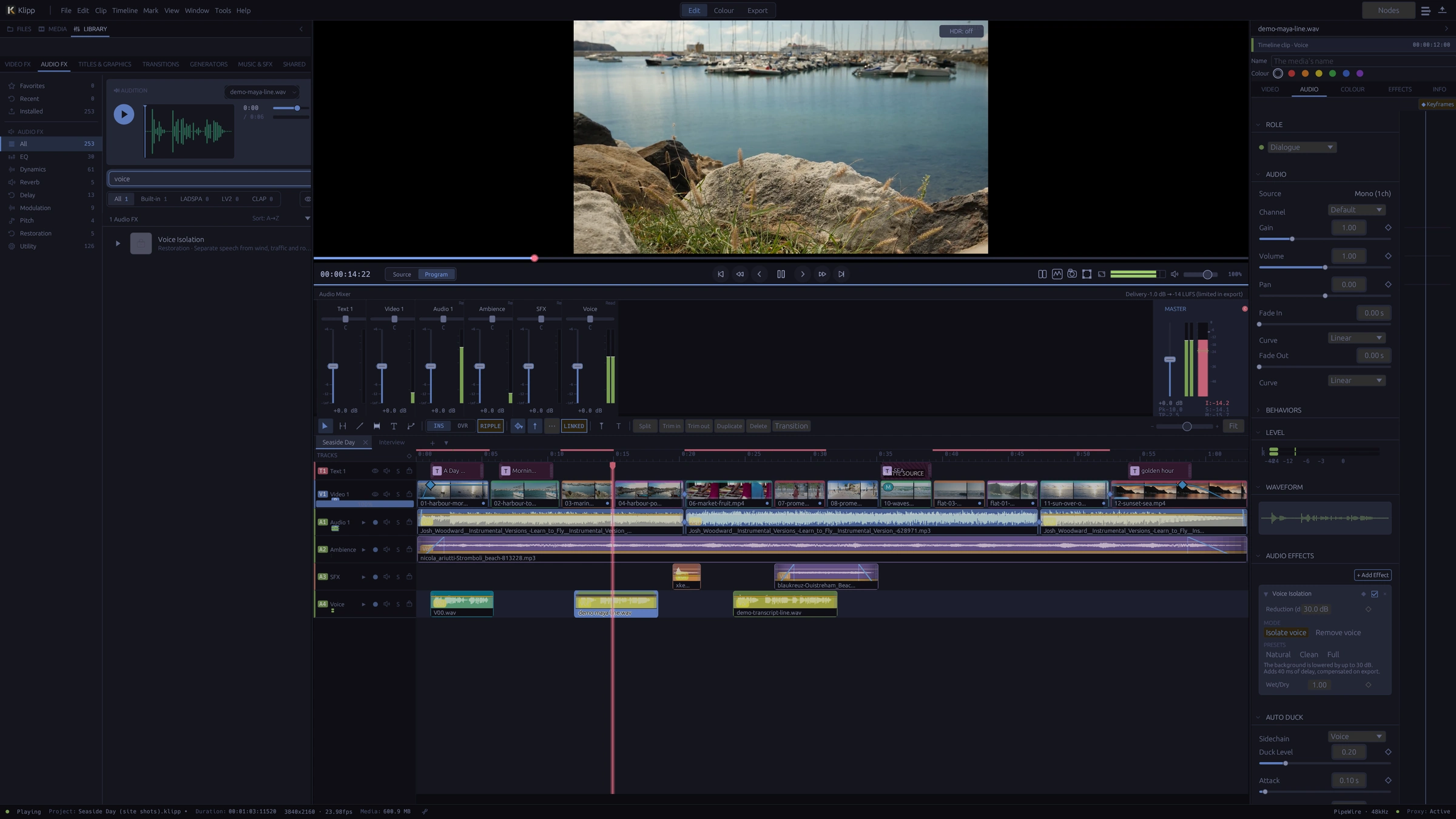
A timeline that moves with you
Build with magnetic multitrack editing, ripple trims, synced multicam, and speed ramps. Add titles and subtitles, or use the transcript to find your cut.
Sound belongs in the edit
Mix tracks, shape a voice with EQ and dynamics, and check delivery loudness. Voice isolation and dual-system sync help bring the recording into the sequence.
02 / The finish
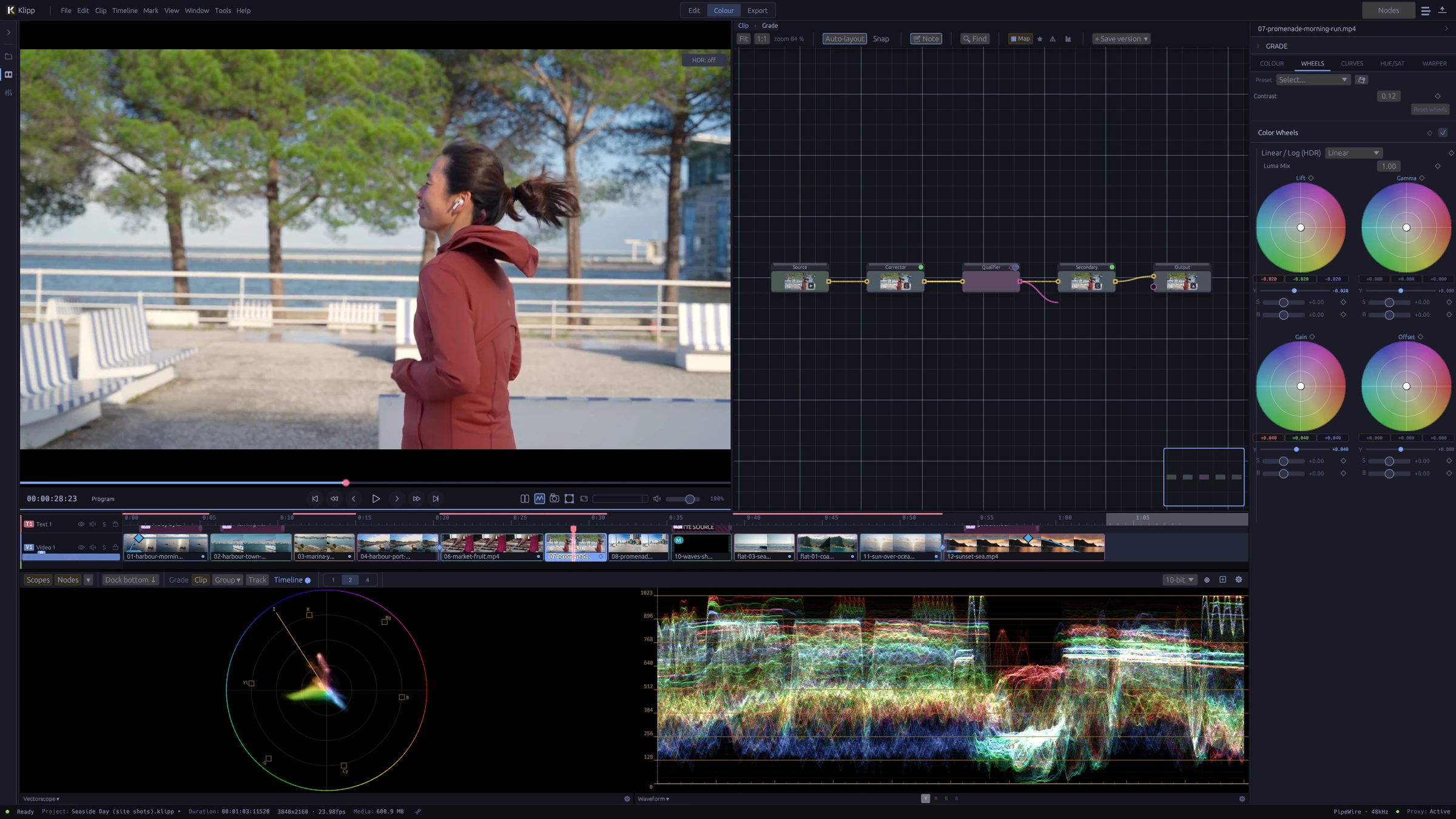
A feel for the image.
A measure of the colour.
Work in a scene-linear pipeline (ACEScg, BT.2020 or Rec.709 linear) with camera-log decoding, node-based grades, colour wheels, curves, and GPU scopes. Finish for SDR or HDR.
03 / A helping hand
Your edit.
More ways to get there.
Transcribe, analyse, and automate.
Klipp’s built-in speech, vision, and audio models run locally. Connect an MCP-compatible assistant to inspect footage, propose an edit plan, build a sequence, and check the result.
An external assistant may use a local or cloud model, depending on your client. Local inference and external assistants are separate choices.
Read about the workflow ↗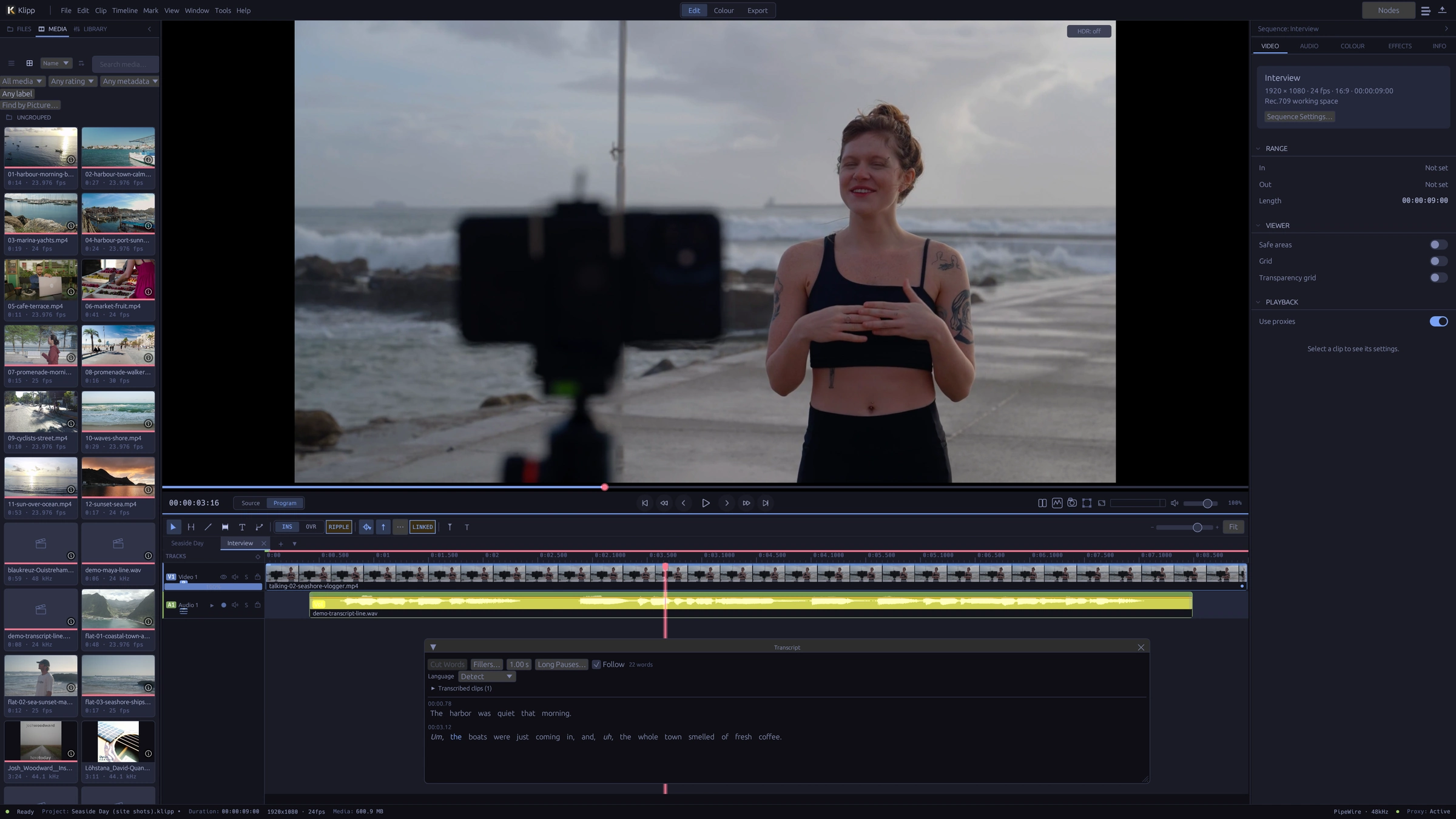
04 / Titles
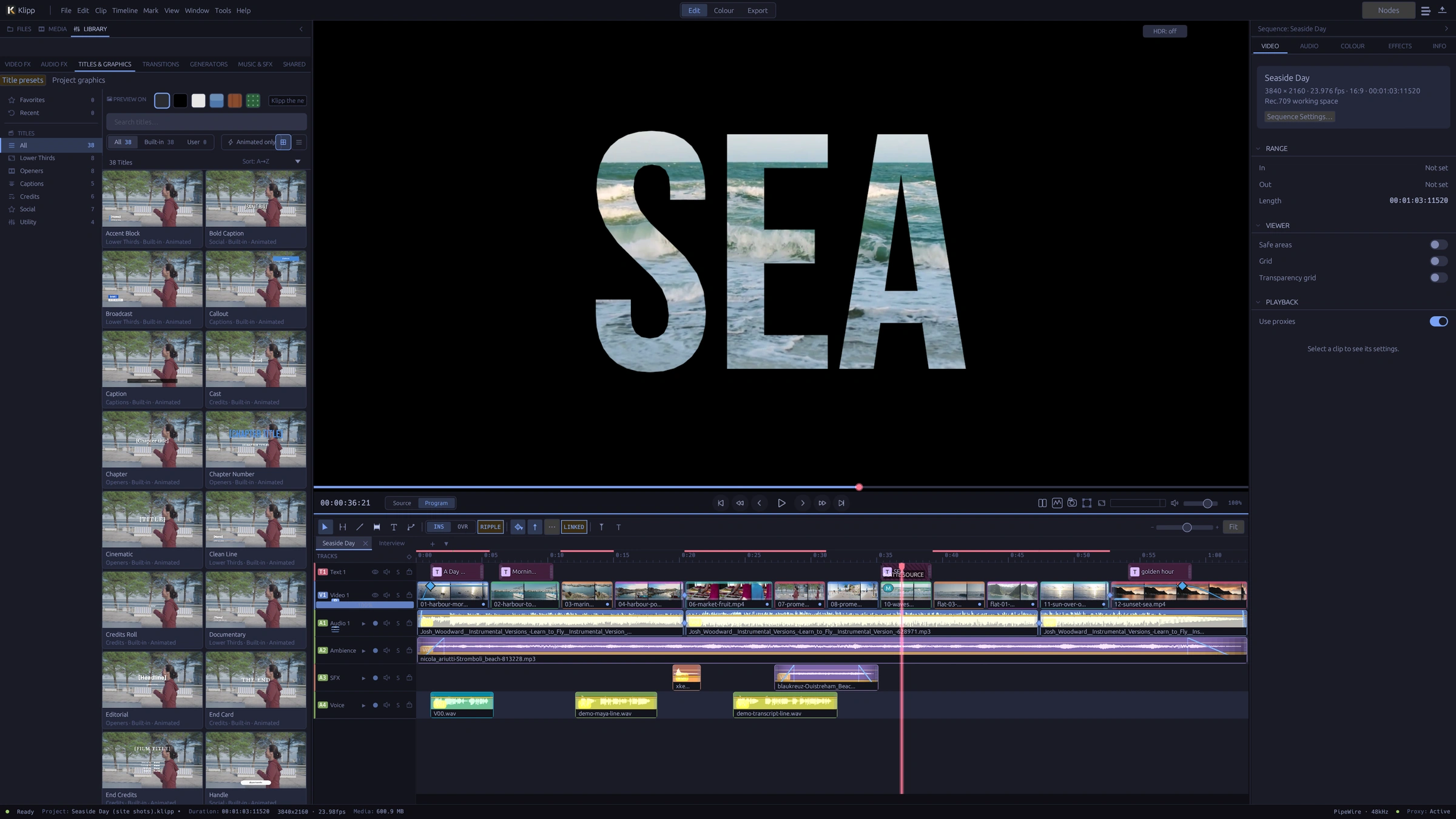
Words that move.
Start from 38 animated title templates, or build your own: complex scripts, variable fonts, 3D text, text on a path, and footage inside the letters with a track matte.
05 / Sound
Hear it in the edit.
Mix on a full mixer with loudness and true-peak meters. Clean up a voice with Voice Isolation on your own machine, duck the music under it, and deliver at your platform’s loudness.
Made in Klipp
Twenty things Klipp does.
A three-minute tour of the real interface: editing, titles, colour, sound and delivery. Cut, graded, mixed, narrated and exported in Klipp. Play with sound for the narration.
Narrated in English, with music. Shown in Klipp 0.1.0-rc.2. Footage, music and sound credits.
In full
All features.
What Klipp 0.3.2 does, by area. Open a group to see the list.
Editing 23
- Magnetic multitrack timeline, with ripple on or off
- Insert, overwrite, replace and fit-to-fill edits from in and out marks
- Ripple, roll, slip and slide trims
- Blade, split at the playhead, lift, extract and ripple delete
- J and L cuts: trim the picture or the sound alone
- Compound clips and storylines of connected clips
- Several sequences per project, duplicated in one step
- A selects timeline for pulling takes
- Synced multicam by timecode, sound or both, cut with keys 1–9
- Speed changes, reverse, freeze frames and speed ramps
- Optical-flow slow motion
- Keyframes with a curve editor, a dope sheet and a motion path in the viewer
- Edit by transcript: delete words, filler words or long pauses
- Markers with notes, colours and kinds, including chapters
- A history window: click any step to go back
- Skimming, a source viewer and match frame
- New version at another aspect: vertical or square, reframed on the subject
- Scene detection that splits a clip at its shot changes
- Shorts: the moments of a long video that work on their own, each built as a vertical short
- Auditions: several takes of a shot in one clip slot, switched and played in place
- Stretch a clip's content to a new length, its keyframes and markers with it
- Effects, transitions, titles and generators previewed while their card is hovered
- Reuse marks: where the timeline shows the same frames twice, or two files that look the same
Media and organising 12
- Import files or whole folders, or drag them in
- Bins and rule-based smart bins
- Ratings, favourites, rejects and keywords
- Logging fields, list columns, sorting and filters
- Camera metadata from EXIF and Sony and Canon XML sidecars
- Metadata sheets in and out as CSV or ALE
- Proxies, and playback from proxies
- Relink media from a whole folder; offline files counted on open
- Find by Picture: describe a shot in words to find it (optional, runs locally)
- Video synced with separately recorded sound in the media pool
- Clips split across camera files joined as one take
- Stills, including HEIC, AVIF, JPEG XL and EXR where your FFmpeg reads them
Colour 20
- Scene-linear grading in ACEScg, BT.2020 or Rec.709 linear
- 15 camera log curves; most are detected on import from the camera
- A node graph per clip, with a picture on every node
- Colour wheels, contrast, exposure, saturation and tone controls
- RGB curves and seven hue, saturation and luminance curves
- HSL, RGB and 3D qualifiers, luma and difference keys
- Colour warper
- Circle, rectangle, gradient and Bezier masks, with tracked windows
- HDR zones for grading HDR
- 3D LUTs (.cube, .3dl, .csp) and 304 bundled film and cinematic LUTs, put on a clip as its look
- ACES output transforms and a colour space transform effect
- Viewer and calibration LUTs that change only the screen
- GPU waveform, parade, vectorscope and histogram; CIE chromaticity and false colour
- Colour Check: names what is off in the frame, and the control that fixes it
- Match shots to a hero shot, or adopt a look from a reference
- Auto white balance, an eyedropper, and skin balance from detected faces
- Auto colour: a starting grade set from the shot
- A grade library shared across projects, with stills, wipe and before/after
- Timeline and track grades, grade versions, and grades pasted onto many clips
- A split shot's grade given to its other pieces in one step
Effects and transitions 15
- 73 transitions, each with a live preview
- Piece transitions: strips, panels, halves and shatter
- Smooth Cut, for jump cuts between takes
- 61 built-in GPU video effects and six one-click looks
- Chroma key and luma key
- Stabilisation, rolling-shutter correction, temporal noise reduction and deflicker
- Particles, lens flare, light rays, glow, halation, VHS and old film
- Displace, Warp, Gradient Map, and reflections in water, on a floor or in glass
- Track mattes, and masks on any effect
- 13 blend modes
- Remove Background, Isolate Object and Detect Objects (optional, run locally)
- Subject tracking, and planar tracking from a click: pin a title, clip or picture to a surface, lit and shaded as it is
- Motion blur per sequence, with shutter and samples
- Effect presets and favourites; most effect settings can be keyframed
- OFX 1.5 and frei0r video plug-ins: subsets of each format; compatibility varies by plugin
Compositing 4
- The Composite page: a clip's picture as a graph under the viewer, with merges, masks, a view of any node, a wipe and single channels
- 14 recipes with live controls: sky replacement, a title behind the subject, screen replacement, a clean-plate background and more
- Save nodes of a clip's picture as a recipe of your own
- Templates with media slots and the controls they expose, shared as one .klipppack file; 13 built in, laid out for wide, tall and square frames
Titles and graphics 19
- 38 title templates in six categories, and templates of your own
- OpenType shaping for complex scripts and right-to-left text
- Vertical text and ruby
- Variable fonts and font fallback
- OpenType features: ligatures, small caps, figure styles, stylistic sets
- Styled runs, with copy and paste of a style
- Gradients, outlines, shadows, glow and neon
- Backings for lower thirds: a box, or shadow and outline
- Paragraphs, lists, tab stops and fit to a box
- Text on a path
- Animators by letter, word or line; staggered entrances and exits
- Extruded 3D text with bevels and lighting
- Rolling credits and crawls
- Type in the viewer with the Text tool; image layers in titles
- Find and replace across titles, and missing-font replacement
- Metal faces that reflect the shot: gold, silver, steel, copper, bronze, chrome
- Text kept readable over busy pictures, and layouts made for 9:16 and 1:1
- A catalogue of open-licence fonts, fetched on request
- Spell checking of titles and captions with your system's dictionaries
Captions and transcripts 11
- Speech transcription on your machine (optional; model downloads on request)
- A transcript panel to set the language and correct words
- Captions made from the transcript in one step
- Captions animated word by word from the transcript's timings
- Glow Caps, a ready-made caption look, and backings one box per line
- SRT, VTT, ASS/SSA, TTML (IMSC), SCC and EBU-STL, in and out
- A subtitle editor, with a caption style per track
- Caption tracks with a language and visibility
- Caption translation on your machine, 14 language pairs (optional)
- Burnt-in or soft subtitles on export
- CEA-608 closed captions embedded in H.264 and H.265
Sound 17
- Multitrack mixer with loudness (LUFS) and true-peak meters
- Clip volume, gain, pan and channel mapping
- Audio crossfades
- 15 built-in audio effects: EQ, dynamics, restoration, reverb, delay, chorus, pitch
- Noise reduction, de-click, de-ess and hum removal
- Voice Isolation, on your machine (optional; model downloads on request)
- Normalise to a loudness or a peak, with a true-peak ceiling
- Track volume and pan automation, recorded live
- Aux buses and track sends, for shared reverb or delay
- Volume keyframes and auto duck
- Sync separate sound by waveform or timecode
- Fit music to a length, in whole bars
- Audio roles, proposed by an on-device classifier
- Sound Over Time: a whole file as frequency against time
- Narration voices on your machine (optional; voices download on request)
- Voice-over recording with punch-in, and audio scrubbing
- LADSPA, LV2 and CLAP audio plug-ins: subsets of each format; compatibility varies by plugin
Delivery and interchange 19
- Export presets for the web, social, masters and broadcast; save your own
- Destinations in New Project: a platform sets the size, frame rate, loudness and captions
- Platform overlays in the viewer: where a player's buttons and captions cover the picture
- Brand kits: a logo, colours, fonts, intro and outro for every project, shared as a file
- H.264, H.265, AV1, VP9, ProRes, DNxHD and animated GIF
- MP4, MKV, MOV and WebM, in 8-bit or 10-bit
- HDR export in HLG or PQ, with HDR10+ metadata for H.265 PQ
- Output transforms for Rec.709, Rec.2020, PQ, DCI-P3 and sRGB
- Hardware encoding (NVENC, AMF, VAAPI) when your FFmpeg has it, with software fallback
- A render queue, and one file per marker range
- Every format at once from a sequence's versions, each rebuilt from its master
- Loudness targets on export
- Audio-only export as MP3, WAV or M4A
- Chapters from markers, written into MP4, MKV and MOV
- A delivery check of picture and sound, and advice when 8-bit will band
- Review copies with burnt-in timecode; comments come back as markers
- Edit exchange: OTIO, FCPXML, CMX3600 EDL and Kdenlive in and out; FCP7 XML and MLT in; AAF with the OpenTimelineIO AAF adapter installed
- The edit comes across (clips, cuts, timing, markers where the format has them), with an import report
- Autosave, backups and recovery after a crash
Performance and platform 14
- A native Linux app, for Wayland and X11, on x86_64 and aarch64 (Apple Silicon under Asahi)
- A Vulkan-capable GPU is required
- Compositing, grading and scopes on the GPU
- Hardware video decoding (NVDEC, VAAPI)
- Freeze a picture or sound track: drawn once, played from what was stored
- Bounce a track to a media file with its transparency and sound
- Heavy frames drawn ahead while the editor is idle, on mains power
- When playback drops frames, the viewer says why and what would help
- Follows the Omarchy desktop theme; eight built-in themes, accent colour and UI scale
- Every AI feature optional, each with its own switch
- Models download on request and are checked by SHA-256
- No account; update checks are off until you turn them on
- A separate HDR reference output window
- A first-time welcome: choose a keyboard layout, take a short tour
Assistant and automation 8
- An MCP server with 145 tools (optional; can be switched off)
- Your MCP client decides whether its model is local or in the cloud
- 76 edit operations; a whole batch undoes in one step
- Footage analysis: shots, sound, motion, speech, framing, beats and on-screen text
- An Edit Plan window to approve, build or discard a proposed edit
- Draft review with a contact sheet and a quality check
- Screen recording, narration and sound effects placed on cuts
- Hide emails, keys and passwords found on screen in a recording
Start here
A work in progress.
Ready to explore.
Klipp is still young, but it works end to end: import, edit, grade, titles, sound and export. The latest release, 0.3.2, is out as signed Arch packages for x86_64 and aarch64. Keep copies of work you care about: the project format can still change between 0.x releases.
Install on Arch-based distributions
x86_64 or aarch64 Linux · Vulkan 1.1 GPU required
Download the package from the release page, then:
sudo pacman -U klipp-0.3.2-1-x86_64.pkg.tar.zst
klippUpdates install from Klipp's About window and are checked against the release's signature. To check the download yourself, or to build from source, see the README and the installation guide. Ubuntu, Fedora and other distributions have no package yet: build from source with the building guide. They are less tested, as is broader GPU compatibility.
Good to know
Which plugin formats does Klipp host?
OFX 1.5 and frei0r filters for video; LADSPA, LV2, and CLAP for audio. Support covers subsets of each format, and compatibility varies by plugin. Broad automated compatibility testing is ongoing. VST2 and VST3 are not supported.
Do I need AI to use Klipp?
No. AI features can be disabled in Preferences. Built-in models download on demand; connecting an external MCP assistant is optional.
Where can I find the documentation?
The repository contains the user guide, detailed project reference, and contribution guide.
Can I bring in a project from Premiere Pro or DaVinci Resolve?
Not their project files, but the edit, yes. Export the timeline as Final Cut Pro XML, FCPXML, OpenTimelineIO or EDL (AAF works when the OpenTimelineIO AAF adapter is installed), then use File → Open Project from Another Editor… in Klipp. The edit comes across (clips, cuts, timing, tracks, and markers where the format has them) and links to your original media, with an import report of anything that could not be brought over. Grades, most effects and titles do not transfer.
Where can I ask for help or share an idea?
In Discussions on GitHub: ask for help, suggest ideas or show what you made. Please report bugs as issues.